It refers to the process where all incoming emails are automatically sent or redirected from one email address to another or to a helpdesk system
What is email forwarding to a help desk?
Email forwarding sends messages received at one email address to another address, such as a support mailbox connected to a ticketing system. It allows an organization to route support requests into a central queue without asking users to change how they contact the company. In help desks, the term can also mean an agent forwarding a ticket to someone outside the team.
How does email forwarding work?
An administrator creates a forwarding rule in the original mailbox or email service. Messages that meet the rule’s conditions are sent to the configured destination, where the help desk can process them according to its email-ticketing setup. Administrators should test forwarding and check for loops, duplicates, or authentication issues.
Benefits of email forwarding
Central routing: Messages reach one support address.
Familiar contact points: Customers keep using the addresses they already know.
No manual forwarding: Employees stop passing emails along by hand.
Consistent tracking: Every forwarded request becomes a ticket.
How does Desk365 fit into email forwarding workflows?
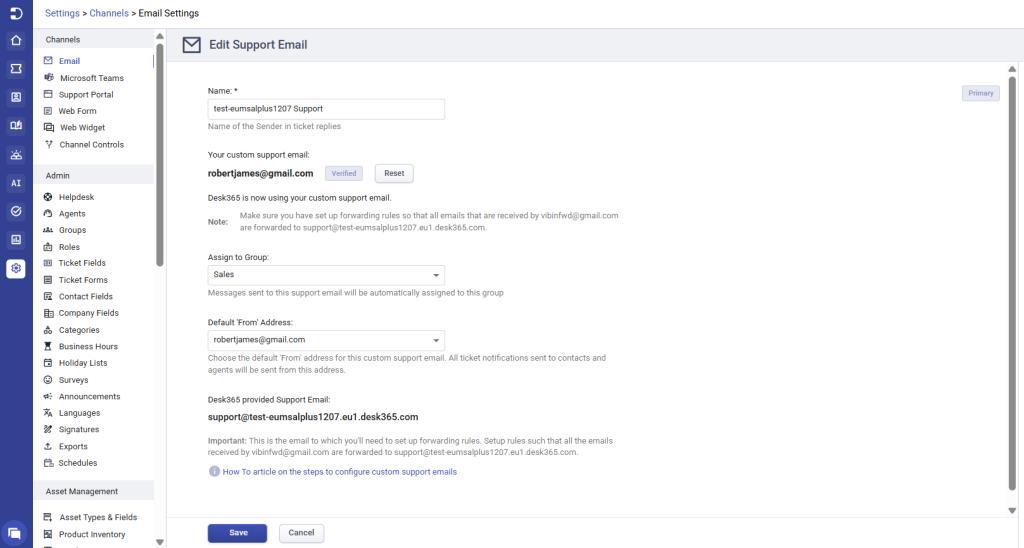
Desk365 turns forwarded email into tickets. Forward your support address to your Desk365 address, then verify it in Desk365.
Step-by-step guides: Forwarding instructions are available for Microsoft 365 (Office 365) and Gmail.
Group routing: Map each forwarded address to a group.
Original sender kept: When an agent forwards a customer email, the customer can be set as the ticket requester.
Domain checks: DKIM and SPF verification for outgoing replies.