A communication tool that sends alerts or updates to users keeping them informed about the status of their requests, updates from support teams, and other relevant information
What are help desk email notifications?
Help desk email notifications are automated emails that inform users or agents about ticket events. Notifications may cover a new request, an assignment, a reply, a status change, or another update supported by the system.
How do help desk email notifications work?
An event triggers a notification rule, which sends a message to the configured recipient. Administrators define which events require an alert and who should receive it. Notification content should be clear and include enough context for the recipient to understand what action, if any, is needed.
Benefits of help desk email notifications
Informed agents: Agents hear about ticket changes right away.
Updated users: Customers receive progress updates without asking.
Less manual checking: Nobody needs to refresh tickets to see changes.
Timely action: Important requests get attention quickly.
How does Desk365 help notify support teams?
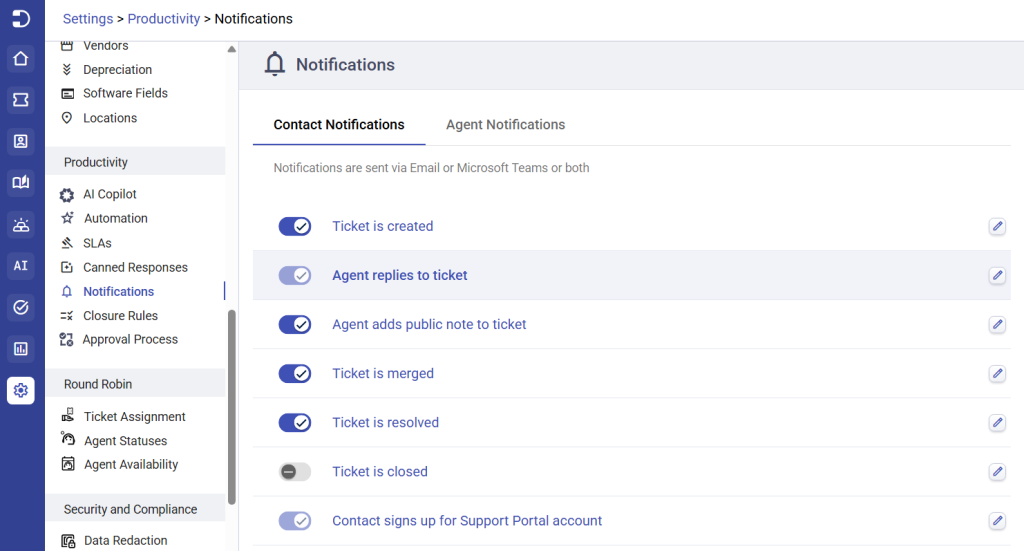
Desk365 sends automatic notifications to agents and contacts for new tickets, replies, assignments, status changes and SLA reminders or breaches.
Email, Teams or both: Agents and contacts choose where alerts arrive.
Editable templates: Admins can change the wording of emails sent to contacts.
Central control: Manage notification preferences by enabling or disabling specific notifications under Settings > Productivity > Notifications.