The process of saving or transferring data from the ticketing system to an external file or format for various purposes, such as analysis, reporting, or archival
What is exporting tickets?
Exporting tickets means downloading ticket records from a help desk into a file for analysis, reporting, recordkeeping, or migration. Depending on the system, an export may include selected ticket fields and related details, subject to permissions and available export options.
How does ticket exporting work?
An authorized user selects the tickets or data range to export, chooses an available format, and downloads the resulting file. Before sharing or storing the export, teams should confirm which fields are included and protect customer information according to their data-handling policies.
Benefits of exporting tickets
Offline analysis: Work with ticket data outside the help desk.
Record keeping: Preserve ticket records for business use.
Spreadsheet review: Sort and filter data in familiar tools.
Migration support: Move data during a planned system change.
How does Desk365 support ticket data workflows?
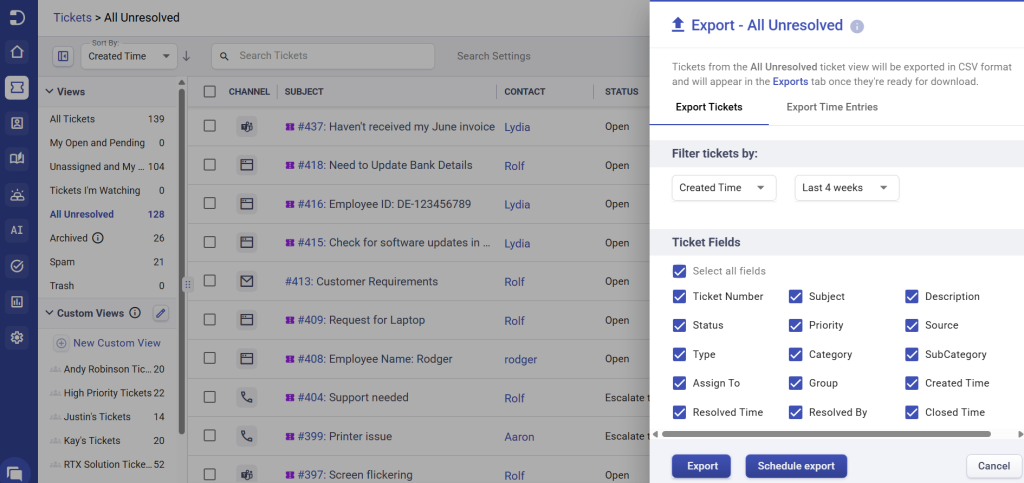
Desk365 exports tickets as CSV files that open in Excel or any spreadsheet tool.
Choose your fields: Include ticket, contact and custom ticket fields.
Filter the export: Export by created, resolved or closed time, or export a saved view or search.
Delivered by email: A download link arrives when the file is ready, and recent exports stay in the Exports tab for seven days.