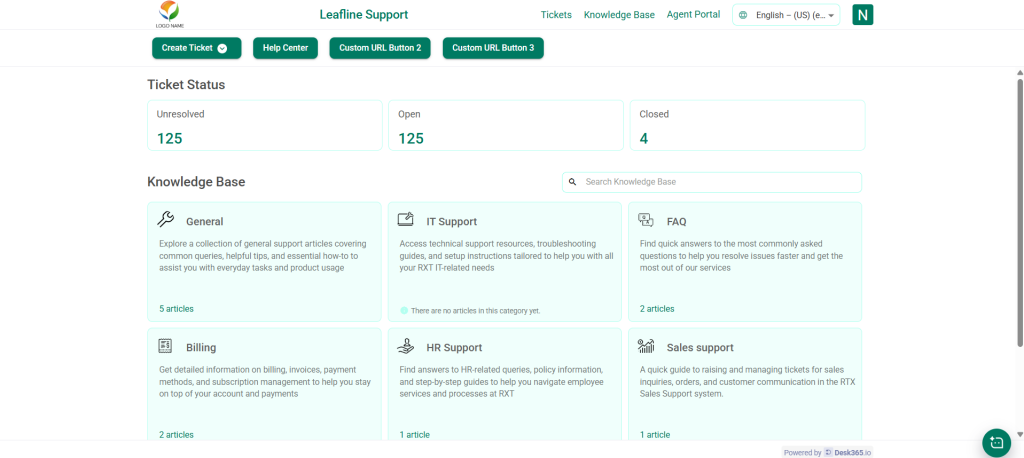
A centralized hub where customers can log in to view account details, track tickets, request support, and access relevant resources.
What is a customer portal?
A customer portal is a secure online space where customers can find support information, submit requests, and follow the progress of their issues. Instead of relying only on email or phone calls, customers can use one place to access help and communicate with a support team.
How does a customer portal work?
A customer visits the portal to search for answers, submit a support ticket, or check an existing request. Depending on how the portal is configured, it may provide knowledge base articles, request forms, ticket status updates, and the customer’s past requests. For example, a customer who cannot access an application can search troubleshooting instructions before submitting a ticket with the details of the problem.
Benefits of a customer portal
Consistent support channel: Customers always know where to go to request help.
Faster answers: Users find solutions in the knowledge base without waiting for an agent.
Clear ticket progress: Customers can see the status of every request at a glance.
Fewer status emails: Customers check progress in the portal instead of writing in to ask.
How does Desk365 help with customer portals?
Desk365 includes a customer support portal where customers create tickets, check the status of their requests and search your knowledge base.
Branded portal: Add your portal name, logo, favicon, background image and theme colors.
Custom domain: Serve the portal from your own URL.
Flexible sign-in: Let customers sign in using either Microsoft Entra SSO or email authentication.
Multilingual: Offer the portal interface in 34 languages, including right-to-left language support.