A record of all financial transactions related to the charges and payments associated with an agent subscription.
What is help desk billing history?
Help desk billing history is a record of billing-related transactions or account charges associated with a help desk subscription. Depending on the provider and account setup, it may include invoices, payment records, subscription changes, or billing dates.
How is billing history used?
An authorized account owner or administrator reviews billing records to reconcile expenses, check previous charges, or maintain documentation for finance teams. When a charge looks wrong, compare it with the plan, agent count and billing period in the subscription terms.
Benefits of billing history
Expense tracking: Follow subscription costs over time.
Invoice reconciliation: Match charges to invoices quickly.
Easy lookback: Review previous charges in one place.
Finance records: Provide documentation for internal finance processes.
How does Desk365 handle billing information?
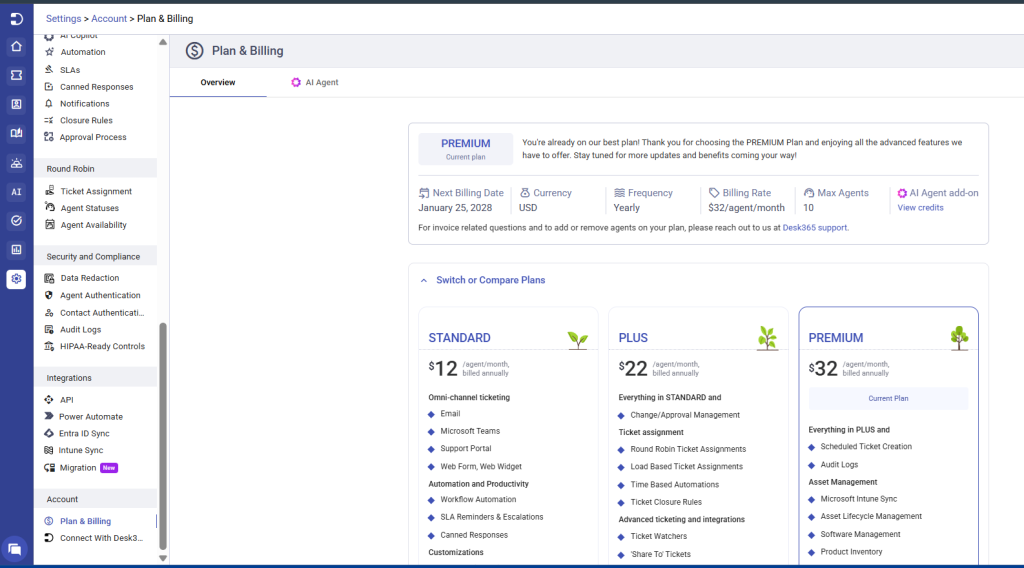
In Desk365, you can manage your subscription under Settings > Account > Plan & Billing. View your plan and billing details, manage your subscription, and choose from available payment methods, including credit/debit cards, ACH, SEPA, and bank transfers. Annual subscriptions can also be paid through purchase orders.