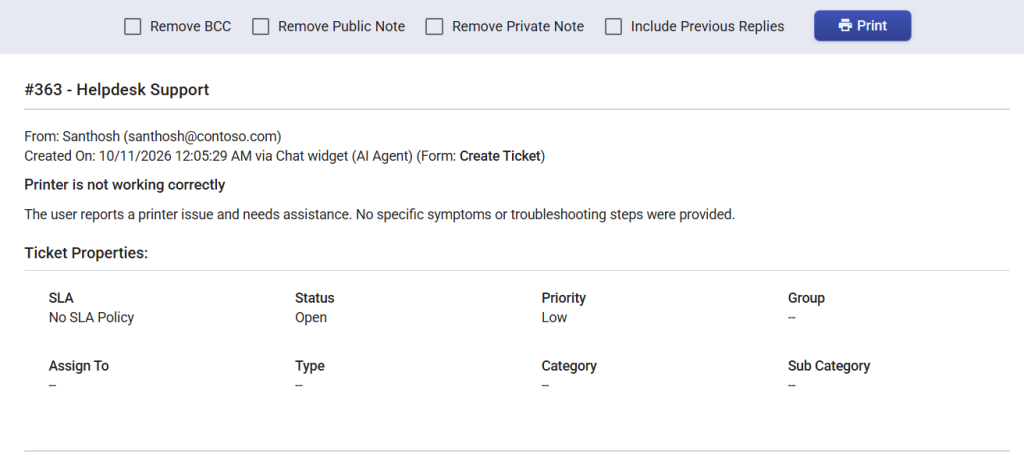
An email transcript is a written record of an email conversation, including messages exchanged between participants.
What is an email transcript?
An email transcript is a written record of an email conversation, including the messages exchanged between participants. In support, it can provide context about the original request, troubleshooting steps, decisions, and the resolution communicated to the user.
How is an email transcript used?
Agents or managers review a transcript to understand what has already been discussed, avoid asking customers to repeat information, and confirm which instructions were provided. Transcripts may also support handoffs, quality reviews, and internal documentation. Access should be limited to people who are authorized to view the conversation.
Benefits of email transcripts
Preserved context: Follow-ups build on what was already said.
Troubleshooting history: Agents see which steps were already tried.
Smooth handoffs: A new agent picks up without starting over.
Quality record: Managers can review conversations for quality checks.
How does Desk365 help preserve support conversations?
Desk365 keeps the full conversation on each ticket, so any agent can read the history before replying.
Full history: Load earlier messages and sort them newest or oldest first.
Internal context: Private notes and forwarded messages stay with the ticket but are hidden from the customer.
Print or export: Print a single ticket or retrieve conversations through the API.