The process of combining multiple tickets or inquiries into a single, consolidated ticket.
What does it mean to merge tickets?
Merging tickets combines duplicate or closely related support requests into one main ticket so the team can manage the issue in a more organized way. It is useful when a user submits the same problem more than once or several requests concern the same incident.
When should tickets be merged?
Tickets may be merged when they describe the same issue and can be handled through one conversation. Before merging, agents should check ownership, customer details, attachments, and conversation history. Separate issues should remain separate when combining them would make tracking or communication confusing.
Benefits of merging tickets
Less duplicate work: Agents handle the issue once.
Unified context: All related details sit in one place.
Consistent replies: Customers get one answer, not several.
Easier tracking: The active issue is simple to follow.
How does Desk365 fit into ticket consolidation?
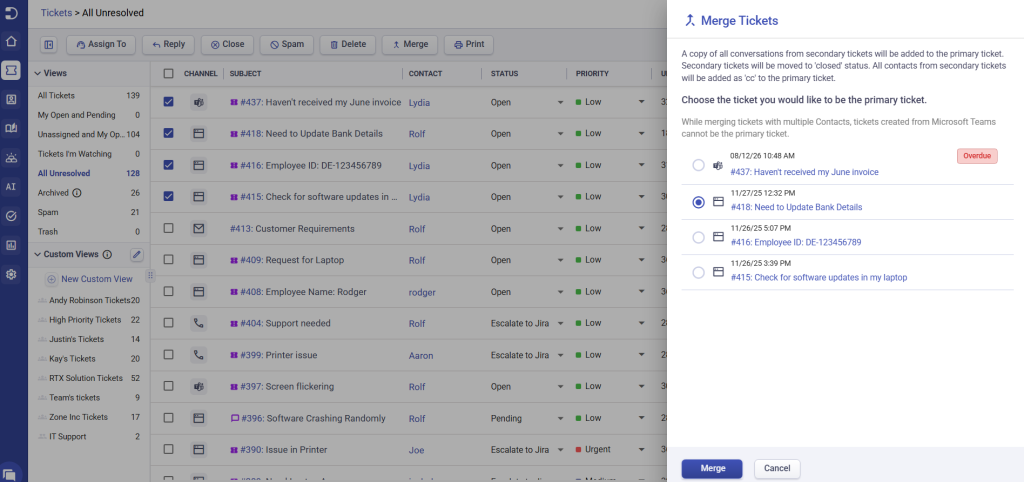
Desk365 lets agents merge duplicate tickets from the tickets list. Select the duplicates, choose Merge and pick the primary ticket.
Nothing lost: Each secondary ticket’s details are added to the primary ticket as a private note.
Everyone informed: Contacts from the merged tickets are added as CC.
Clean queue: Secondary tickets close automatically.